
Welcome to ABAP RESTful Application Programming Model(RAP) Tutorials
This tutorial will take you through ABAP RAP (ABAP RESTful Application Programming Model) from foundational concepts to advanced techniques. Whether you’re just starting out or aiming to deepen your expertise, this comprehensive guide will equip you with the knowledge and skills needed to master SAP RAP. Let’s explore modern ABAP development step by step and unlock its full potential.
Watch the video below to get an overview of what you’ll be learning.
A demo to demonstrate what you will be learn in the RAP Beginner Tutorial
1. Create New Package for your application
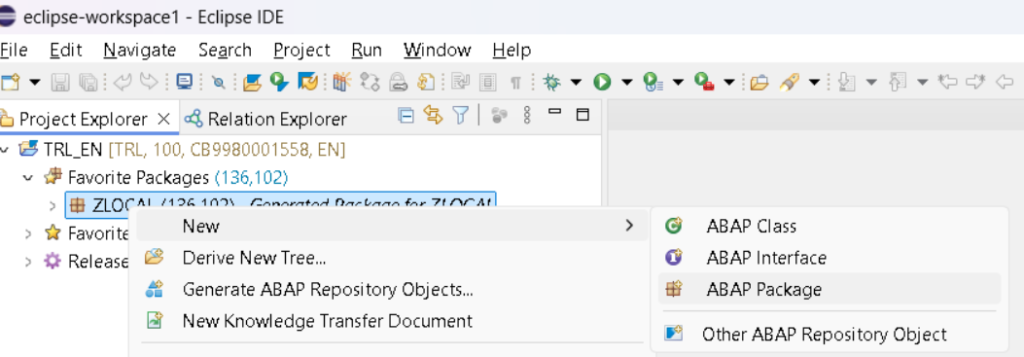
2. Create Database Table and Insert records
Think of a Travel entity as a way to store all the essential information about a trip. This includes details like the agency ID, customer ID, the current status of the travel booking (whether it’s confirmed, pending, etc.), and the price of the travel. By creating this table, you’re setting up the foundation for managing travel-related data in your application
Right-click on your ABAP package and choose New > Other ABAP Repository Object from the context menu.
Right-click on your ABAP package and choose New > Other ABAP Repository Object from the context menu.

3. Add fields in the Travel Table structure
Replace the default code with the provided code snippet, ensuring that you use your own table name and description in place of the defaults. This will ensure the table is correctly defined according to your naming conventions and description.

4. Insert Records in the travel table
Right-click on your ABAP package and choose New > ABAP Class from the context menu. Provide Class Name and Description and hit next. It will ask you to give TR, select your TR and Finish.

CLASS zcl_raptech_gen_demo DEFINITION
  PUBLIC
  FINAL
  CREATE PUBLIC .

  PUBLIC SECTION.
    INTERFACES if_oo_adt_classrun.
  PROTECTED SECTION.
  PRIVATE SECTION.
ENDCLASS.


CLASS zcl_raptech_gen_demo IMPLEMENTATION.
  METHOD if_oo_adt_classrun~main.
        " data decleration
        DATA:
            attachment      TYPE /dmo/attachment,
            file_name          TYPE /dmo/filename,
            mime_type       TYPE /dmo/mime_type.

        " clear travel table
        DELETE FROM ZRAPTECH_TRAVEL.

         "insert travel demo data
    INSERT ZRAPTECH_TRAVEL  FROM (
        SELECT
          FROM /dmo/travel AS travel
          FIELDS
            travel~travel_id             AS travel_id,
            travel~agency_id          AS agency_id,
            travel~customer_id      AS customer_id,
            travel~begin_date        AS begin_date,
            travel~end_date           AS end_date,
            travel~booking_fee      AS booking_fee,
            travel~total_price         AS total_price,
            travel~currency_code   AS currency_code,
            travel~description       AS description,
            CASE travel~status                 "[N(New) | P(Planned) | B(Booked) | X(Cancelled)]
              WHEN 'N' THEN 'O'
              WHEN 'P' THEN 'O'
              WHEN 'B' THEN 'A'
              ELSE 'X'
            END                               AS overall_status,
            @attachment                 AS attachment,
            @mime_type                 AS mime_type,
            @file_name                    AS file_name,
            travel~createdby            AS created_by,
            travel~createdat             AS created_at,
            travel~lastchangedby    AS last_changed_by,
            travel~lastchangedat     AS last_changed_at,
            travel~lastchangedat     AS local_last_changed_at
            ORDER BY travel_id UP TO 10 ROWS
      ).
      COMMIT WORK.   " To commit in database table
       out->write( |Demo data generated for table ZRAPTECH_TRAVEL.| ).

  ENDMETHOD.
ENDCLASS.

To run your class, select the ABAP class, click the Run button, then choose Run As > ABAP Application (Console), or simply press F9.
5. Preview Table data
Open your Travel database table and press F8 to initiate the data preview and view the populated database entries (i.e., the travel data).
